Tools
PDF Tools 34
Image Tools 5
AI Writing 13
Text Tools 13
SEO and websites 22
YouTube and video 13
Calculators and converters 17
Developer Tools 13
Other tools 2
Scanner Blog
Language

Convert Files to Markdown

Convert Word, Excel, PowerPoint, PDF, HTML, CSV, JSON, and EPUB files into clean, structured Markdown for free, with automatic OCR support for scanned documents.

Processed on Jood's server · file deleted afterwards

Drag and drop your file here or click to choose a file

Instantly convert your documents, spreadsheets, presentations, and PDFs into clean, structured Markdown text

Word (DOCX, DOC, ODT) Excel (XLSX, XLS, CSV) PowerPoint (PPTX, PPT) PDF + OCR HTML & EPUB JSON, XML, TXT
Maximum file size: 95 Megabyte
Preparing file for conversion...
File converted to Markdown successfully!
Optical Character Recognition (OCR) used
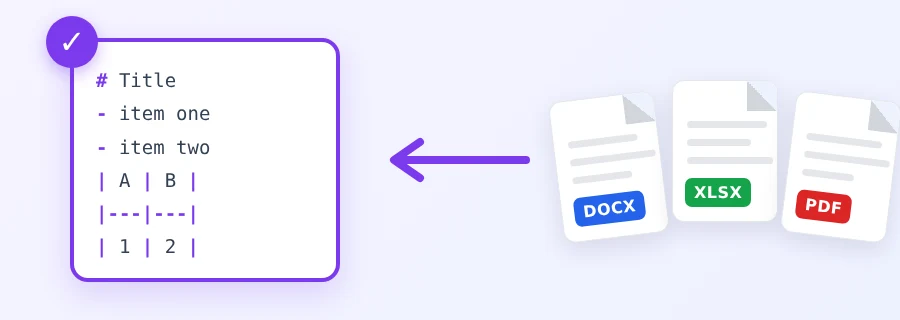
Illustration of Word, Excel and PDF files turned into Markdown text

Why so many people need Markdown now

If you paste documents into ChatGPT, Claude or Gemini to summarise them or ask questions, you have probably seen tables fall apart and headings vanish when copying straight from Word or a PDF. Markdown fixes that. It is plain text, but a heading starts with #, a list item with a dash, and a table uses | bars. AI models read this structure well, and so do GitHub, Notion, Obsidian and most documentation tools.

Converting a whole document by hand is tedious. This tool does it for you: upload the file and get Markdown text ready to copy, or to download as an .md file.

Supported formats

  • Word documents: DOCX, DOC, ODT and RTF. Headings, lists and tables are kept.
  • Excel workbooks: XLSX, XLS, ODS, CSV and TSV. Each sheet becomes a table under a heading with its name.
  • PowerPoint decks: PPTX, PPT and ODP. Slide text in order, with each slide title.
  • PDF: text PDFs directly, scanned PDFs through optical character recognition (OCR).
  • Web pages and books: HTML and EPUB.
  • Data and text files: JSON, XML, YAML and TXT.

Maximum file size: 95 MB.

How to use it

  1. Drag the file onto the upload area, or click it and pick the file.
  2. Click “Convert to Markdown Now”. Progress is shown, and if the server is busy with other files you see your place in the queue.
  3. Check the result in the “Markdown Code” tab, or switch to “Formatted Preview” to see headings and tables rendered.
  4. Copy the text with the copy button, or download an .md file named after your document.

Text PDF or scanned PDF?

If the text in your PDF can be selected, the tool reads it directly and picks out paragraphs, lists and simple tables. If the file is made of images from a scanner or a phone, the tool runs OCR in Arabic and English automatically on the first 30 pages. Accuracy then depends on the scan: a sharp, straight page gives clean text, a blurry or tilted one gives mistakes.

Some Arabic PDFs store certain letters incorrectly inside the file itself. If you have the original Word document, convert that instead and the result will be much more accurate.

Tips for a clean result

  • In Word, use heading styles (Heading 1, Heading 2) rather than a manually enlarged font. Styles become # and ##; enlarged text stays a paragraph.
  • For a long scanned document, you can first make it searchable with the OCR PDF tool, then convert the result to Markdown.
  • Need an editable document rather than Markdown? Use the PDF to Word tool.
  • File too large to upload? Shrink it first with the Compress PDF tool.

What happens to your file?

Conversion runs on the Jood server, because reading Office files and running OCR cannot be done as well inside a browser. Your original file is deleted as soon as the conversion ends, and the Markdown text is removed from the server once it reaches your browser. No account is needed.

FAQ

The PDF to Markdown tool is for PDF files. This one also accepts Word, Excel, PowerPoint, HTML, EPUB, CSV and JSON, using the same engine.
Yes for Word, Excel and HTML: tables come out as full Markdown tables. For PDFs only simple tables are detected, because a PDF does not store table structure.
It covers the first 30 pages, and the tool tells you when the file is longer.
No. The original is deleted as soon as conversion ends, and the result as soon as it reaches your browser.
95 MB per file.
About this tool

Convert Word, Excel, PowerPoint, PDF, HTML, CSV, JSON, and EPUB files into clean, structured Markdown for free, with automatic OCR support for scanned documents.

Why convert your files to Markdown?
  • Ready to copy directly into ChatGPT, Claude, and Gemini without losing tables or headings.
  • Ideal for documenting projects on GitHub, Notion, and Obsidian.
  • Supports extracting Arabic and English text from scanned PDFs via automatic OCR.